Simple webcam control and customisation tool
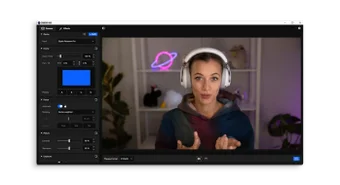
Elgato Camera Hub is a desktop application built to give users full control over compatible webcams and video-input devices. It handles everything from manual image adjustments to virtual camera output, making it easier to run high-quality video for streaming, calls, or content creation. Users can tweak exposure, white balance, shutter speed, and more, then save those settings to persist across devices.
Top Recommended Alternative

Elgato Camera Hub offers virtual backgrounds, custom effects, and support for external devices such as capture cards or virtual-camera pipelines. The program simplifies webcam management and provides flexibility for video presentation in streaming, work, or personal use.
Features and control depth
Elgato Camera Hub provides precise, fine-tuned control over webcam output, allowing users to manually adjust ISO, shutter speed, white balance, noise reduction, zoom, and other settings to match various lighting and composition requirements. Preferences can be saved directly to the camera’s internal memory, ensuring that chosen configurations carry over across sessions and devices, significantly reducing repeated setup time and enhancing workflow efficiency for content creators and streamers.
The application supports a variety of input devices, from dedicated webcams to HDMI capture devices, ensuring connected hardware is recognised accurately. A framing grid overlay assists with composition, while a compact mode keeps the workspace uncluttered. Additionally, “Low-Light Mode” enhances brightness and reduces noise, making this tool improve video quality in dim environments and ensuring clear, visible footage even under challenging lighting conditions for streaming or content creation.
Some users report that the application can be unstable under certain conditions, occasionally freezing, failing to open properly, or crashing, particularly after updates or when used with specific hardware configurations. Additionally, while it offers a wide range of manual controls and customisation options, it lacks advanced background blur and other sophisticated video effects, meaning users may need separate software to achieve more complex visual enhancements for professional-quality video.
Useful core tool for webcam users
Elgato Camera Hub is a highly useful utility that provides granular control over webcam output, ensuring consistent video quality across different devices and environments. Its ability to save settings directly to the camera, along with support for multiple input sources, makes it practical for streamers, remote workers, and content creators alike. Although occasional instability may occur, the overall flexibility, convenience, and control offered typically outweigh these minor drawbacks.